
StPaint Plus

Stereoscopic 3D Depth Paint Program, Upper version of StPaint V1.5
Launced with DepthMap Import & Export Functions
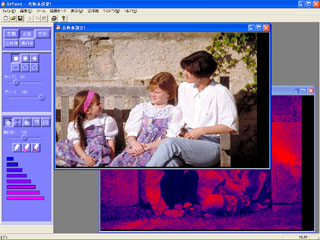
[Image] Operation windows of StPaintPlus
|
Extremely smooth and natural 2D/3D conversion can be realized by the simple Depth Painting Method.
New functions such as DepthMap Import & Export are added in the StPaint Plus, so you have become able to use external software such as Photoshop to create Depth Map Images.
StPaint Plus is a Stereoscopic 3D Depth Paint Program that allows you to convert any ordinary 2D image to a pair of 3D images by simple painting method. By using various kinds of Depth Pens such as Brushes, Average Depth Pens, you can realize extremely smooth and natural 3D conversion.
StPaint Plus supports Anaglyph display, so you can create 3D images by checking the 3D effect in real time with any ordinaly 2D color display.
 StPaintPlus User's Manual(1.8MB・・/a> StPaintPlus User's Manual(1.8MB・・/a>
|
Download StPaintPlus Trial version from here.
Trial Version Download Free(16.5MB)
StPaint Plus Trial Version 1.6
- You can not save bitmap stereo images such as JPS, Anaglyph of JPEG, TIFF, BMP, but StPaint original STP file can be saved (8192x8192 pixels max).
- Except above restriction, you can use all the necessary functions to make 3D Depth Painting.
- When purchasing the licence key (Serial number) and making the user registration, the above restictions are automatically removed.
|
Purchase StPaint License Key(Serial Number)
by PayPal.
- Price: US$85.-
- Contact Texnai by e-mail info@texnai.co.jp to purchase the Serial Number".
- You will receive your Serial Number by e-mail within 2 or 3 business days after your purchase.

|
|
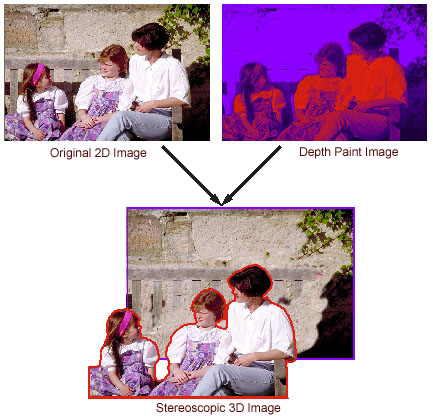
[Main Functions of StPaint]
- Available images to import: JPEG, TIFF, BMP ---- upto 8192x8192 pixels depending on system memory.
- Automatic 2D/3D conversion: Brightness, Red componet, Reverse
- Various kinds of depth pen:
- Gradation of Deph:
- Geometric area definition: Circle, Rectangular, Polygon.
- Realtime 3D Display: Anaglyph, xPol 3D LCD・・icroPol), Sharp Auto3D LCD
- Save as JPS, Color Anaglyph, Gray Anaglyph, Side-by-side (Cross and Parallel), H-Interleave, Sharp's G-shift Parallax Barrier
- Save as STP file that allows you to remake your depth paint work ---- upto 8192x8192 pixels depending on system memory.
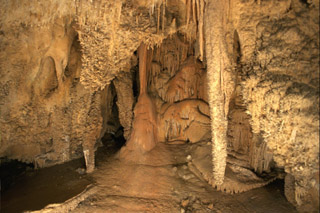 | 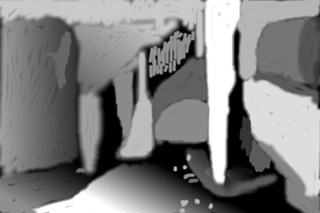 |
| Original 2D Image | Depthmap Image |
[System required]
- CPU:Intel or the compatible
- OS:Microsoft Windows XP,2000, Vista,7,8,10
- RAM:128MByte or more
- Hard disk
- Display: Full color, 1024x768 pixels or more
[Available Stereoscopic Displays]
- Standard Color Monitor for Anaglyph
- micoPol or xPol LCD
- Auto3D LCD----Sharp, DTI, Pavonine
* Specifications and designs shown in this site are subjects to change without notice.
* Maker's name and product names are registered trade marks of those company in general.
Texnai, Inc.
4-7-3-505 Miyauchi, Nakahara-ku, Kawasaki-shi, Kanagawa, Japan
 Tel:81-(0)44-863-9545
Fax:81-(0)44-863-9597 Tel:81-(0)44-863-9545
Fax:81-(0)44-863-9597
e-mail: info@texnai.co.jp
Copyright:Texnai, Inc.
|
|
